














Spare parts ordering for construction equipment
Found by machine, at the customer’s price, straight into your ERP.
- Find parts by machine
- Each customer’s own prices
- Reorder in a few clicks
- Emailed orders read into the ERP
For equipment suppliers and dealers selling spare parts to construction firms. Your parts desk stops taking the same orders by phone and email.
£349 a month. Start with a free trial.
Who this is for
Equipment suppliers and dealers who sell spare parts and wear parts to construction firms, plant hire companies and contractors. Customers buy for machines already on site, so the order starts with the machine, not the catalogue.
If your machines are configured or priced one by one, this is the wrong tool. If you sell parts on account at agreed prices, it fits.
Sound familiar?
- “I need the filter kit for the excavator, serial ends 4471.”
- Someone looks up the machine, then the part, then the customer’s price.
- “Can you resend that? The part you sent was for the older model.”
- An email arrives with a PDF parts list and a purchase order number.
- Then every line is typed into the ERP.
What goes wrong, and what we build
Parts are ordered by phone and email, with the machine serial in the message
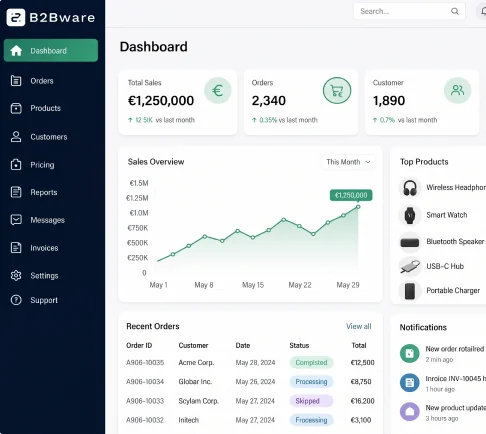
A portal where customers find parts by machine, from your own parts and machine data, and add them to an order
The wrong part goes out because the model or serial was misheard
The part list is tied to the machine, so the customer picks from what fits
Staff check a price list before they can quote
Each customer sees their own prices and terms, live from your ERP
The same parts are reordered every few weeks, one call at a time
Order history and reorder, so a repeat order is a few clicks
Orders arrive as PDFs and spreadsheets and are retyped into the ERP
Emailed orders are read, matched to your part numbers and posted to the ERP after your team approves
What we build
One portal and one ERP link, built and run by us for a fixed price.
Find by machine
Customers choose their machine and see the parts for it, using the machine and parts data you already hold. We do not sell a fitment database.
Customer prices
Every account sees its own prices, range and terms, taken from your ERP, so the portal matches what you will invoice.
Reorder
Past orders are one click from a new basket. Regular wear parts stop being a phone call.
Emailed orders into the ERP
Customers who still email a PDF or spreadsheet are not left out. The order is read, matched and posted once your team approves it.
How it works day to day
What changes for your parts desk and your customers once it is running.
The customer finds the part
They sign in, pick the machine and see the parts for it at their own price and with current stock.
The order goes in
They add the parts, or reorder a past basket, and send it. It arrives in your ERP as a sales order.
The email still works
A customer who emails a PDF parts list gets the same result. Your team checks the matched lines and approves them.
Your team handles exceptions
The parts desk deals with stock queries and special requests, not retyping. If the ERP link needs fixing after an update, we do it.
Related pages
Where to read more.
- Construction industry How contractors buy and what we fix for construction suppliers.
- Industrial machinery Spare parts for dealers and agents selling machinery.
- Trade portal The customer-facing portal with each account’s own prices.
- Emailed orders PDF and spreadsheet orders read into the ERP.
- Search and filtering Finding the right part by code, machine or specification.
- Order history and reorder Repeat orders in a few clicks.
- Contract-based catalogues Each customer sees the range and prices agreed with them.
- Order matching Customer part codes matched to yours, remembered for next time.
Book a free consultation
Tell us what's not working: orders retyped from emails, the same reorders by phone, or a webshop that doesn't match your ERP. We'll come back with a plan and a fixed price. You keep the plan either way.